UPDATE 2.24.14
LinkedIn Now Lets You Block Other Users – Mashable
LinkedIn Announces Member Blocking – LinkedIn
Now, I still think this needs a little lot of work, but *yay* It’s about damn time!
Note: At this time, you can’t block anonymous viewers of your profile.
Fellow group members can see all your contributions to those groups, so there is no capability to block these members from following you.
I wonder how many people have been harmed after asking for help and protection from stalkers only to be told “Newsflash, people: YOU ARE NOT THAT IMPORTANT.” Yes, someone actually said this. (see Victoria Ipri’s comment left on Feb 21 at 05:24 PM on this post.)
—–
Before we begin . . . You may have read my rants online about how frustrating it is that you can’t block folks on LinkedIn. Why on earth would I ever want you ask? Read these articles. They may help you understand a bit better as to why having a blocking feature on LinkedIn is SO important.
- What happened to privacy settings? Why can’t I block a stalker! [Linkedin Help Center] Really too bad this question was closed. It is such an important issue to address. Be sure to read Adel’s post : LinkedIn, give me the tools to protect myself
- LinkedIn Loophole : Blocking Not an Option
- LinkedIn Stalker Concerns Prompt Petition To Add Blocking Feature
- LinkedIn Has A Stalker Problem – BuzzFeed
- LinkedIn: Protect your users from stalkers and help keep victims safe [petition]
- LinkedIn Agrees to Block Stalkers (no release of this feature yet and “LinkedIn currently requires a court order that a member can not have a LinkedIn profile in order to be eligible for blocking.”
Recently, I noticed that there was no feature to block people from commenting on my LinkedIn status updates without going on full lock down. Now I am not talking about my comments in a group, but my status updates. Yes, I have my settings set to public so that people I share groups with (“in my network”) can follow me – but does that mean I then have play comment nanny to my every update? After googling for help, hoping for a simple solution, that most every other social networks, like Facebook and Twitter, offer when it comes to spammy commenters or trolls. I finally gave up and sent in my question to the big boys as LinkedIn to verify and got this as a response. . . 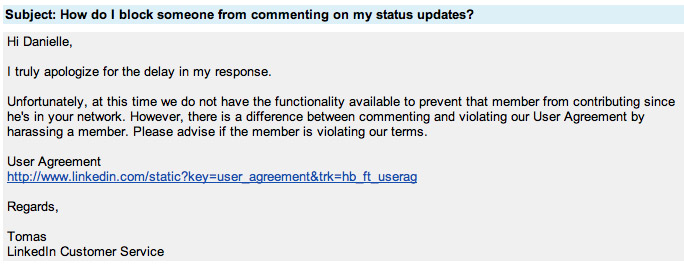 You can (if you haven’t already) read the LinkedIn User Agreement that Tomas referred to. To say I was disappointed is an understatement. We, as users, should have the option to block people if we so choose. Having this option as a user allows us greater freedom to create the experience we want within the social netowork. We simply should not have to accept the added work of playing hall monitor on every LinkedIn status we post when a common feature like blocking would alleviate the added stress. This loop hole in LinkedIn leaves a wide berth to those who “comment bomb” those they follow publicly and share a group with but are not connected to. And ask yourself . . . Do you know who’s following you on LinkedIn? Thankfully you can easily create custom messages for only your connections using HootSuite. Now be warmed that this is only available for your desktop. So, if you have stalker issues or someone that is harassing you online – forget about posting to “connections only” using HootSuite app via your mobile device. For now. *fingers crossed this feature comes to mobile where I spend 90% of my posting time* On average, 65% of Time Spent on Social Networks Happens on Mobile. Is there a workaround? Yes. You can login to your HootSuite dashboard via your mobile browser or use the LinkedIn mobile app. Note: Thanks to @Greg_Savage for reminding me about this user issue and encouraging me to post about it. Take a minute to read his post that sparked the conversation : Are you a LinkedIn Liar? — POLL >> Do you think LinkedIn should offer you the option to block people you are not directly connected to from following you and commenting on your personal status updates?